Document scope
Select formats, languages and representative samples. Define unreadable-document and missing-field handling.
Invoice automation
Collect invoice details, find the related purchase records and bring the checks into one review. We automate the repeated preparation so your finance team can focus on differences, approvals and the records that need attention.
Invoices arrive in different formats. A person reads each document, enters the fields, finds the purchase record and asks someone else to explain a mismatch. The source and the decision can become separated across inboxes and spreadsheets.
A complete invoice review
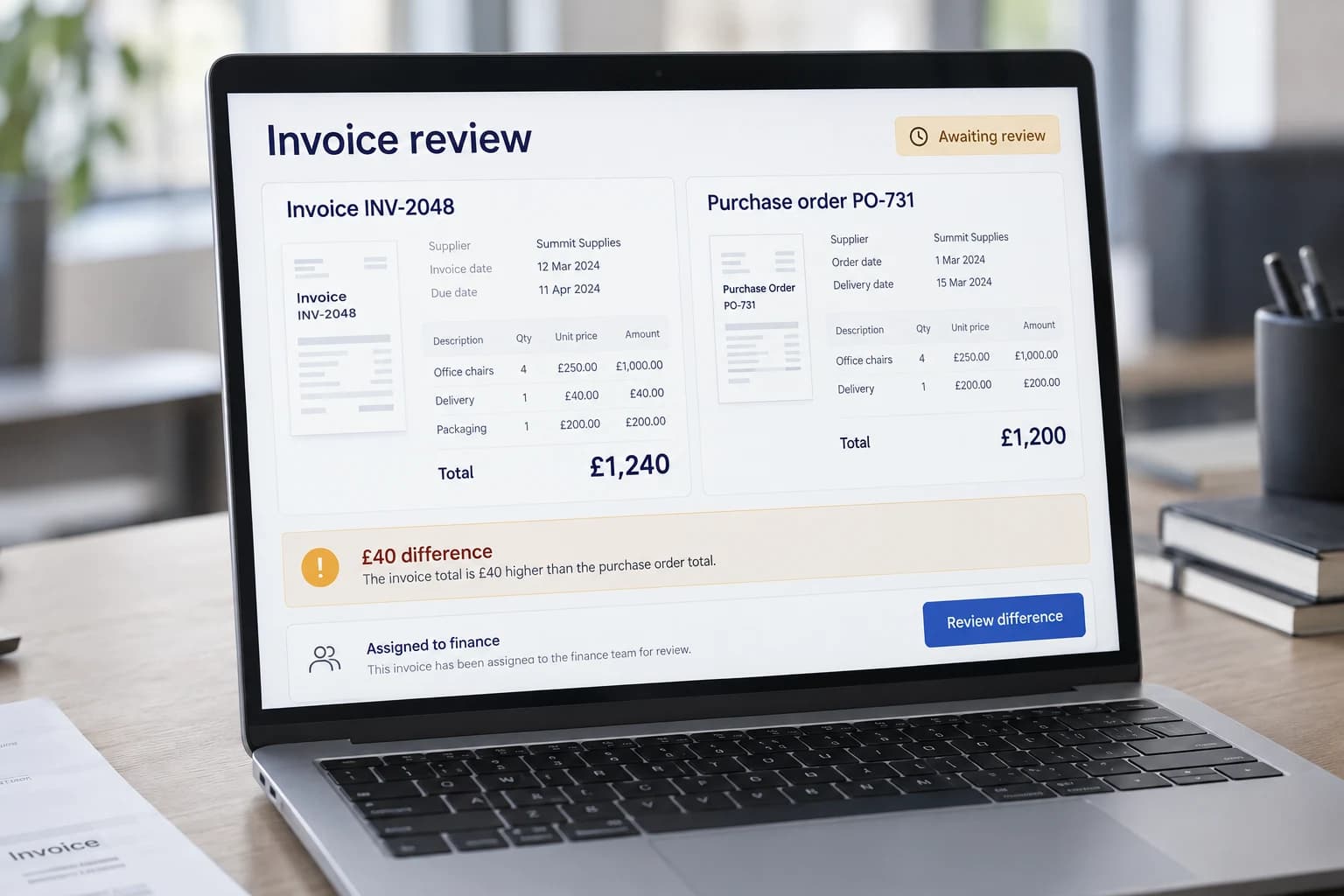
An invoice total can be read correctly and still differ from what was agreed. We put the invoice beside its purchase record and highlight the difference so a reviewer can investigate it with the documents to hand.
Here, a £1,240 invoice is compared with a £1,200 purchase order. The £40 difference remains awaiting review; the system has prepared the check, not approved the cost.
Your team approves the next step. Preparing an accounting record does not initiate a payment.
From handoff to next step
The systems, rules and review points are agreed during discovery.
Intake
Keep the source file and receipt reference in the agreed intake location.
AI-assisted
Propose supplier, invoice reference, dates, currency, line items and totals with the source available.
Rule-based
Check required fields, arithmetic, duplicate references and the agreed matching rules.
Human review
Show differences alongside the invoice and purchase record. Hold unresolved items.
Integration
Pass approved fields to a supported draft entry or export, retaining the source and decision reference.
A focused first build
Select formats, languages and representative samples. Define unreadable-document and missing-field handling.
Agree supplier identifiers, purchase references, duplicate checks and any permitted variances.
Identify who resolves extraction errors and who can approve business exceptions; retain both decisions.
Confirm supported draft or export access and reconcile each approved item with its destination reference.
This scope prepares records for accounting review. It does not execute payments, change supplier bank details or replace accounting judgement. Those actions need separate controls and scope.
Check how your systems could connectEvidence before expansion
Measure the current process first. Set acceptance thresholds together, then compare the pilot against representative normal and exception cases. These are proposed measures, not promised savings.
Example and boundaries
Process a sample PDF, compare the invoice with its purchase order and receipt, then decide how to handle a difference. The demo creates unpaid accounting drafts in an isolated workspace; it sends no payments.
Explore invoice review and approvalScope questions
Start with the process and its exceptions, then establish what the systems can support.
A pilot can prepare an agreed export or draft for review if the current system supports it. Direct posting is a separate decision after access and controls have been checked.
No. Unreadable documents, missing references and mismatches need a review route. Representative examples establish which cases can proceed under agreed rules.
Those requirements need to be tested against representative documents. Scans may need OCR, and layout or language differences can change extraction accuracy and cost. We agree supported formats and the review route for unreadable fields. The website demo processes a defined text-based PDF layout, not every possible invoice format.
No. This workflow prepares information for accounting review and an agreed draft or export. Payment execution and supplier bank-detail changes are separate, sensitive actions that require their own scope, permissions, and verification. Approving an extraction or matching result is not the same as approving payment.
We scope source references, duplicate checks, matching results, reviewer decisions, and destination references together. Corrections should retain enough context to explain what changed and why. Retention, access, and any formal audit requirements must be agreed for your environment rather than assumed from the demonstration.
Next step
Tell us how the request arrives, which tools it passes through and where your team needs to intervene.
Discuss your workflow