

Invoices & documents
Collect attachments and read the supplier, invoice number, dates and amounts. Keep the original document beside the extracted details for checking.
Finance & Administrative Automation
Invoices and expense requests often mean copying details, finding supporting records and chasing approvals. We connect those steps so your finance team receives the documents and checks together. Approved information can move into your accounting software while your team keeps control of financial decisions.
Talk through your workflowSound familiar?
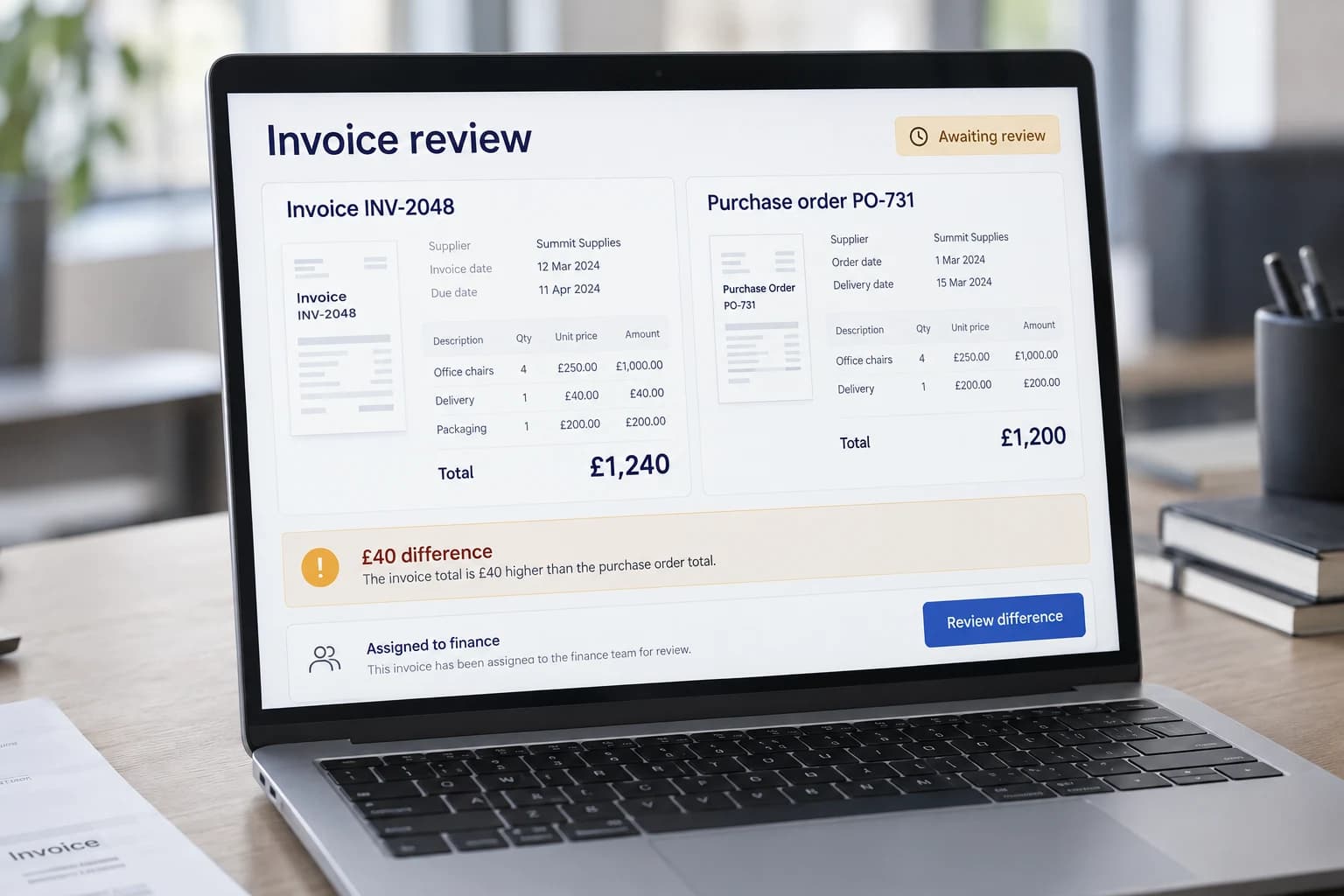
Invoice checks & approvals
Checking an invoice often means opening attachments, finding the purchase order and asking colleagues what was delivered. We bring that information into one review so finance can see what matches and what needs an explanation.
Invoice details can be collected automatically, checked for duplicates and compared with purchase records. Differences go to the responsible person, with the original documents available alongside them.
Your team approves the next step. Preparing an accounting record does not initiate a payment.
See the difference
Bring the document, its matching record and the approval status together before passing information to the next system.
INV-2048 · PO-731
Extract draft fields
Check for duplicates
Match the purchase record
Prepare approval
ReadyA checked invoice is ready for review, with its source document and purchase reference attached.
A difference in amount or supplier details holds the invoice for review. No payment is initiated.
Where automation can help
A focused starting point can make the next step clearer. These are the areas we can explore around your existing systems.
Collect attachments and read the supplier, invoice number, dates and amounts. Keep the original document beside the extracted details for checking.
Compare invoices with purchase orders and delivery records. Highlight differences and possible duplicates for the finance team to investigate.
Send expense claims and complete requests to the right approver. Keep the supporting documents and decision together so progress is easy to check.
Prepare approved details for an accounting draft or agreed export. Compile recurring summaries of what is ready, waiting or still being reviewed.
One workflow, end to end
A supplier emails an invoice against a purchase order. The finance team needs the invoice details, purchase reference and delivery evidence before deciding whether it is ready.
Store the incoming invoice reference and extract draft supplier, amount and purchase-order fields.
Validate required fields and check whether the invoice reference has already been received.
Match the invoice to the purchase order and available delivery evidence. Highlight differences rather than hiding them.
Give the reviewer the source and comparison. Pass the approved record to the accounting system only within the agreed scope.
Potential business impact
Start with the current process. Agree what improvement would look like, then evaluate the workflow against it.
Prepare reusable information from the records already received.
Separate complete records from those needing investigation.
Keep the supporting information and decision together.
Move approved information through supported accounting interfaces.
Behind the workflow
The technology follows the process: what needs to happen, which systems hold the information and who can authorise the next step.
We check how your inbox, document storage, purchasing and accounting tools can share the required information. Original files remain linked to the records created from them.
Reading an amount from an invoice is only the first step. We also check totals, purchase references and duplicates, with uncertain details clearly marked for a person to review.
We agree who can view, correct and approve each record, and retain a history of those decisions. Payment execution is a separate process with its own agreed controls.
Where this can be useful
Finance & Administrative Automation FAQs
Practical answers about the work, the systems involved, and the decisions your team keeps.
We start with one document or approval process, representative examples, and the finance team's controls. Document variety, volumes, matching rules, access, and review needs affect the estimate and timeline. Extraction services, platform licences, hosting, and support are identified separately so the running cost is clear.
Explore delivery and ongoing improvementUseful starting points include collecting documents, checking required fields, matching invoice and purchase records, routing approvals, and preparing draft entries or exports. We scope one process with your team and separate repetitive preparation from accounting judgement and authority to approve a transaction.
We first check whether it supports the required imports, exports, APIs, or draft-entry operations. A reviewed export can be a practical starting point when direct posting is not appropriate. Access, product plans, field mappings, and accounting controls need to be confirmed before a connection is promised.
That is not assumed. The initial scope can prepare information and route it to an authorised reviewer. Payment execution, supplier bank-detail changes, and other sensitive actions need separate scope, permissions, and controls. An extracted invoice or matched record is not by itself authority to pay.
We define duplicate checks, required fields, and matching tolerances using representative documents. Unreadable items, uncertain values, and differences outside the agreed rules go to review. The source document and comparison should remain available so a reviewer can distinguish an extraction error from a genuine business discrepancy.
We scope the decision history your process needs, including source references, corrections, approvers, and destination records. Access and retention are agreed with the system owners. If a formal audit or regulatory requirement applies, it needs specific review; an activity log alone is not a compliance guarantee.
No. It supports preparation, checks, and the agreed flow of records. Your finance team and advisers remain responsible for accounting treatment and applicable obligations. Country-specific rules, approval limits, and filing requirements must be scoped separately rather than inferred from a generic automation workflow.
Explore invoice preparation and reviewNext step
Bring us the documents, checks and approval steps your team handles repeatedly. We'll help you find what can be connected while keeping decisions with the right people.
Talk through your admin process