

Sales
Capture new enquiries, assign them to a salesperson and prepare follow-up tasks. Keep customer records current as the conversation progresses.
Explore sales workflowsWorkflow Automation
When a request moves between email, spreadsheets and business software, your team often becomes the connection. We automate the repeated steps: collecting details, requesting approval, assigning work and updating records. Your team can see what is waiting and where they need to make a decision.
Talk through your workflowSound familiar?
Approvals & handovers
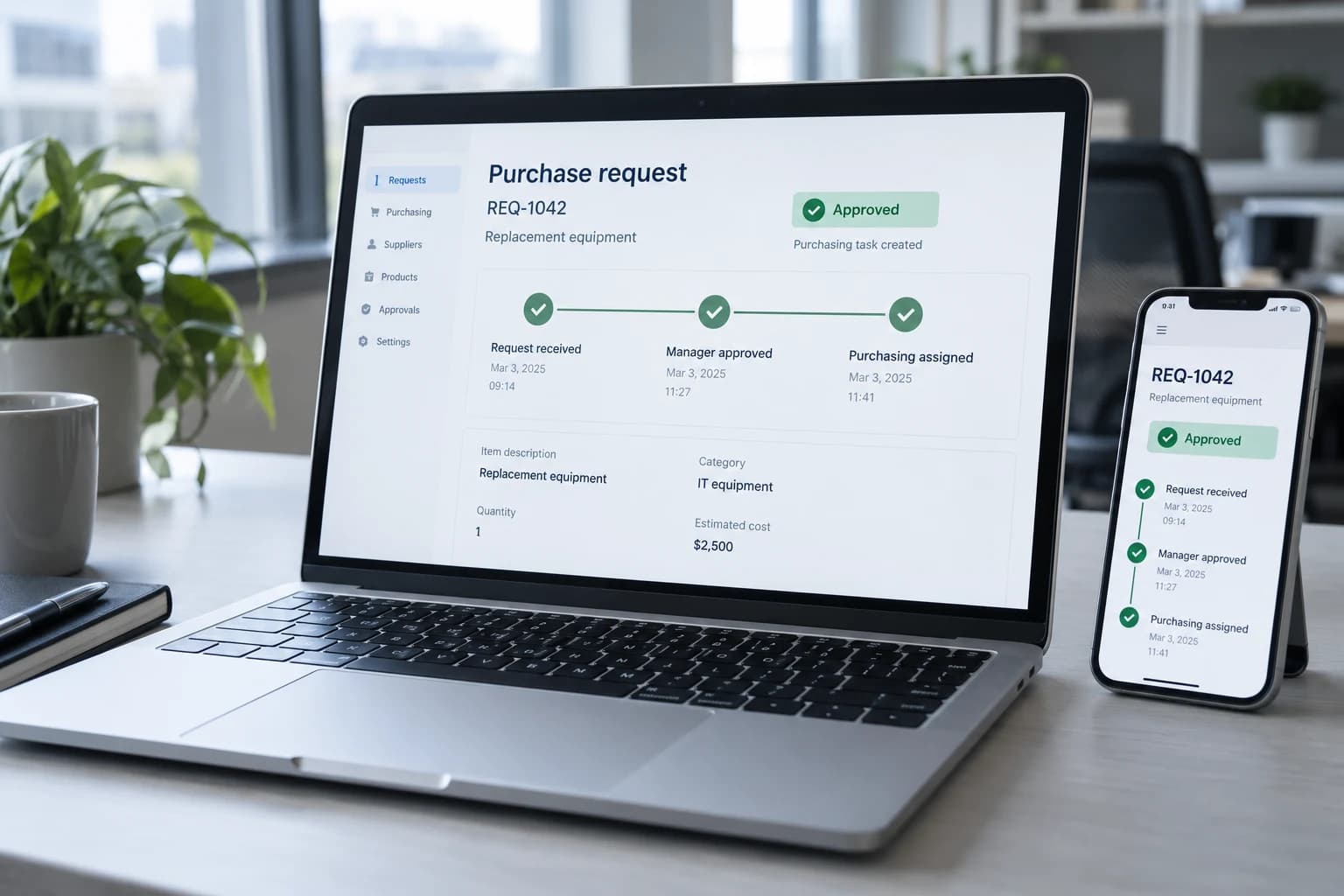
An approval should set the next step in motion. We connect requests, decisions and assigned tasks so your team can see what needs doing without searching through email threads.
For a purchase request, that means collecting the details once, sending them to the right manager and creating a purchasing task after approval. The decision stays attached to the request.
Your spending limits, approval responsibilities and existing tools determine how the work moves.
See the difference
Keep the tools that work. Connect the handoffs that currently depend on someone remembering what comes next.
REQ-1042
Check required details
Route to the budget owner
Record the decision
Create the approved task
ReadyThe next team gets an assigned task with the full context.
The budget owner approves the request before a task is released.
Where automation can help
If your team does it repeatedly, it may be worth automating. These are examples, not packages. We build around your workflow.
Capture new enquiries, assign them to a salesperson and prepare follow-up tasks. Keep customer records current as the conversation progresses.
Explore sales workflowsTurn confirmed orders into assigned work. Connect stock checks, scheduling and delivery updates so each team knows what is ready.
Explore operations workflowsCollect invoice details, compare them with purchase records and send differences for review. Prepare routine reports without rebuilding spreadsheets.
Explore finance workflowsOrganise incoming requests, find the relevant customer information and prepare replies for review. Give unanswered enquiries a clear owner.
Explore enquiry workflowsBring the day's figures and outstanding work into one view. Help managers see where a decision is needed and who is responsible.
Explore business reportingOne workflow, end to end
A team needs replacement equipment. Today, the request passes through email, a spreadsheet and a series of reminders. A connected workflow gives each step a clear owner.
Collect the item, reason, cost and requesting team once. Give the request a reference everyone can use.
Validate required information and use the agreed spending rules to identify the approver.
Send the budget owner the request and supporting details. Record approval or rejection.
Create the purchasing task, attach the decision and notify the requester of the next step.
Potential business impact
Give your team more time for work that needs their judgement. Reduce the copying and chasing, keep decisions with the right people, and measure the improvement against today's process.
Capture information once and carry it through the process.
Give every waiting request an owner and a next step.
Make follow-ups part of the workflow rather than someone's memory.
See what is complete, what is waiting and why.
Behind the workflow
The technology follows the process: what needs to happen, which systems hold the information and who can authorise the next step.
We check how your software can share information, whether through a built-in connection, direct access or a scheduled file. The approach depends on what each tool supports and how quickly your team needs updates.
We define what starts the process, which details are required and who approves each decision. Spending limits, missing information and unusual requests are part of that design from the start.
If a system is unavailable or an update fails, the workflow records what happened. Safe steps can be tried again without creating duplicates; unresolved items go to a named person.
Where this can be useful
Workflow Automation FAQs
Practical answers about the work, the systems involved, and the decisions your team keeps.
Repeated tasks with clear inputs, decisions, and owners are useful candidates: copying records, routing approvals, assigning work, or preparing routine updates. We assess volume, effort, exceptions, and access before choosing a pilot. An unclear process may need simpler rules or better data before software can improve it.
No. Defined rules are often enough for tasks such as validating fields, routing a request, or updating a record. AI can help interpret unstructured emails or documents, but adds evaluation and review needs. We use it only where it serves a specific part of the workflow.
Yes. We agree which actions can run under defined rules and which need approval. A reviewer can receive the relevant context, approve or reject a proposal, or resolve an exception. Decisions and permissions are designed into the process rather than treating every incoming request as authority to act.
The design needs to distinguish completed, failed, and uncertain actions. We agree failure notifications, safe retries, and manual recovery. Before replaying an update, the workflow should check whether it already happened so that a timeout does not create a duplicate order, task, or message.
Yes. A focused pilot can connect a small number of systems around one useful outcome. We check supported access, required subscriptions, and the exceptions the pilot must handle. A manual fallback and named process owner help your team evaluate the change before expanding it.
See how we assess system accessCompare build and running costs with a baseline of handling time, repeated entries, errors, and delays. Include time spent reviewing exceptions and maintaining the workflow. We agree the scope and success measures before delivery; efficiency gains or a financial return are not guaranteed just because a task is automated.
Explore the manual-work estimatorNext step
Show us how work moves between your tools. We'll help you identify the handoffs worth connecting and a practical place to start.
Talk through your workflow