

Enquiries & assignment
Collect requests from your website or inbox and send them to the right salesperson. Assignment can follow territory, service or an existing customer relationship.
Sales & Customer Workflow Automation
New enquiries can get lost between inboxes, customer records and personal reminders. We connect those steps so each request reaches the right person with the customer history and a clear follow-up. Your team can focus on the conversation while routine record updates happen around it.
Talk through your workflowSound familiar?
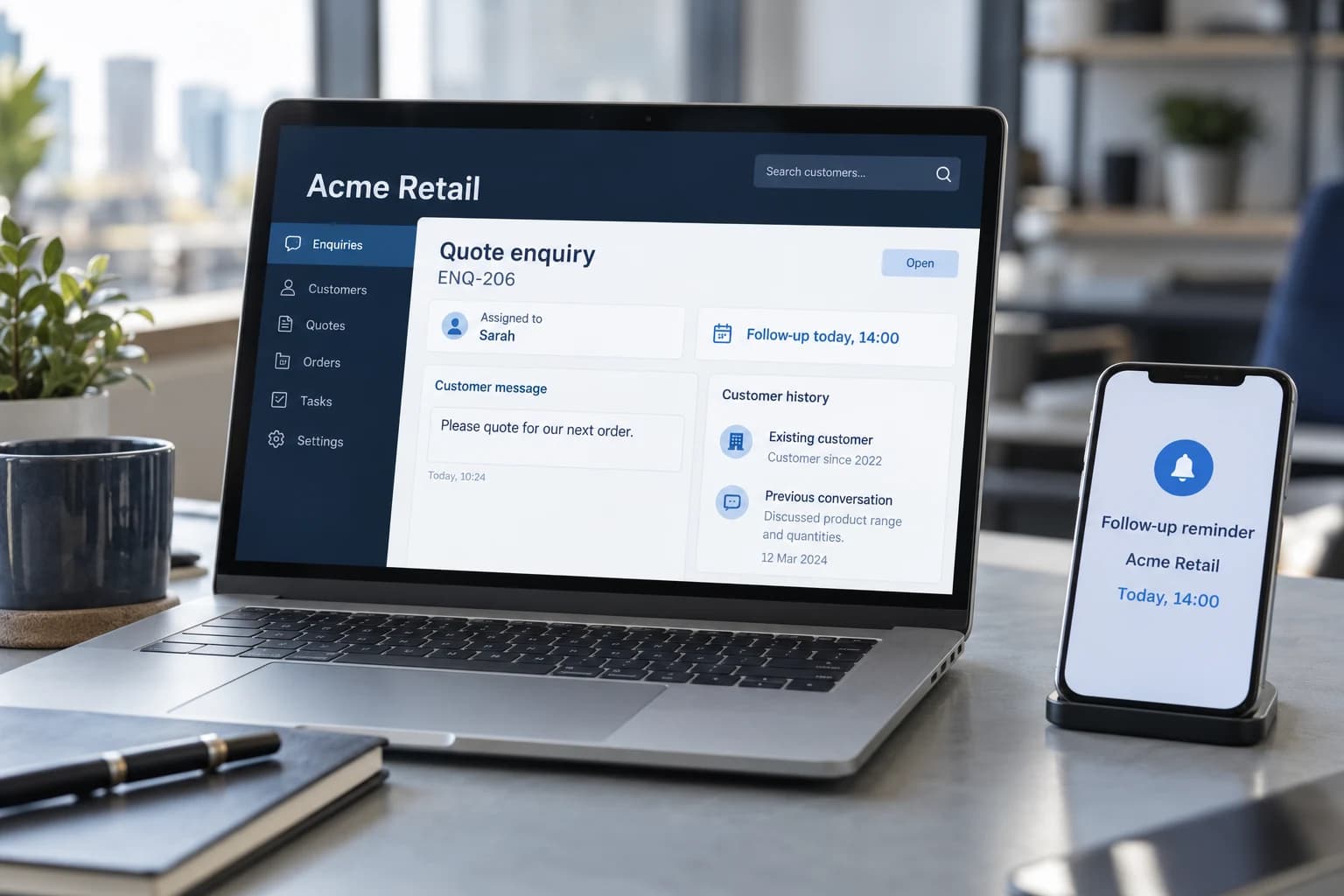
Customer continuity
When an enquiry arrives, the salesperson should have the request, customer history and next action together. We connect your forms, inboxes and customer records to make that handover happen.
An existing customer can be matched to their account, the enquiry assigned to their salesperson and a follow-up scheduled. Your team spends less time updating records and more time responding with context.
Every enquiry has an owner and a follow-up date. Prices and customer commitments remain subject to your approval rules.
See the difference
Give the right person the customer context and a next action, while avoiding duplicate records and premature replies.
ENQ-206 · Acme Retail
Capture the enquiry
Match the customer
Assign a salesperson
Schedule a follow-up
ReadyThe assigned salesperson receives the enquiry, account history and a follow-up task.
Pricing, commitments and customer replies follow your existing approval rules.
Where automation can help
A focused starting point can make the next step clearer. These are the areas we can explore around your existing systems.
Collect requests from your website or inbox and send them to the right salesperson. Assignment can follow territory, service or an existing customer relationship.
Check whether the customer already has an account before creating another. Keep their enquiry and relevant history together for the person responding.
Gather the information needed for a quote and create dated follow-up tasks. Drafts can be prepared for your salesperson to review before sending.
When a proposal is accepted, prepare the next tasks: request documents, arrange an appointment or pass the agreed work to the delivery team.
One workflow, end to end
Acme Retail sends a website enquiry. They already have an account and a salesperson, but the form submission does not yet know that.
Record the contact details, requested products and preferred timing with a reference to the original message.
Check the CRM for a reliable account match. Attach the enquiry to Acme Retail rather than creating a duplicate.
Notify the account owner with the enquiry and relevant previous activity. Prepare the information needed for a quote.
Create a dated task under the agreed response rules. Close or update it when the salesperson records the outcome.
Potential business impact
Start with the current process. Agree what improvement would look like, then evaluate the workflow against it.
Give incoming requests an accountable person and a next step.
Carry useful information from intake into customer records.
Make reminders and handoffs visible to the team.
Put the customer history beside the current request.
Behind the workflow
The technology follows the process: what needs to happen, which systems hold the information and who can authorise the next step.
We check how your forms, email, customer management software and calendars can work together. The original request stays available so the salesperson can read what the customer actually asked.
We agree how to recognise existing customers and assign new requests. Uncertain matches go for review, and a fallback owner handles enquiries when the usual contact is unavailable.
Replies and reminders use the permissions and approval steps you agree. Failed deliveries remain visible, and scheduled follow-ups stop when the enquiry is closed.
Where this can be useful
Sales & Customer Workflow Automation FAQs
Practical answers about the work, the systems involved, and the decisions your team keeps.
Yes. A pilot can cover one intake channel, a defined set of customer fields, and a clear next step. We estimate the work after checking access and routing rules. CRM plans, messaging charges, AI usage, and maintenance may contribute to ongoing costs, depending on the agreed design.
See how we scope a pilotWe assess supported connections from your forms, inboxes, or other agreed channels to the CRM. The workflow can match a customer, capture context, and assign a next step under defined rules. Fields, permissions, duplicate handling, and the owner of each request are part of the scope.
We agree the purpose of each message, channel preferences, timing, stop conditions, and required permissions before enabling sending. An incoming enquiry is not blanket permission for marketing. A first phase can prepare drafts or tasks for review while your team retains control of external communication.
We define which identifiers are reliable and what to do when they conflict. Uncertain matches should go to a reviewer rather than automatically merging customers or overwriting records. We also agree which system owns each field and retain enough context to investigate a change.
Where approved source access is available, AI can help summarize an enquiry or draft a response with relevant context. We agree the information it may use, examples of acceptable wording, and review rules. Missing facts, sensitive requests, and promises about prices or delivery should not be guessed.
Routing rules should include a fallback owner, escalation conditions, and visibility into unassigned or overdue requests. We agree how urgency is identified and when a person reviews it. Automation can help surface a delay, but it cannot guarantee a response without the team's operating coverage.
The aim is to reduce repeated preparation and make the next action clear. Your team continues to own relationships, exceptions, and important decisions. We evaluate measures such as response preparation time, missed follow-ups, and handoff quality rather than promising more sales or replacing people.
See a focused enquiry workflowNext step
Show us how you capture enquiries, assign ownership and follow up. We can help you connect the steps around a better customer conversation.
Discuss your customer workflow