

Multi-language
Communicate with customers and teams across languages.
AI Integration · Business intelligence that acts
Bring AI into the work your team handles every day: finding information, checking documents and preparing follow-ups. We connect it to your existing business tools, define what it can do and keep the right decisions with your people.
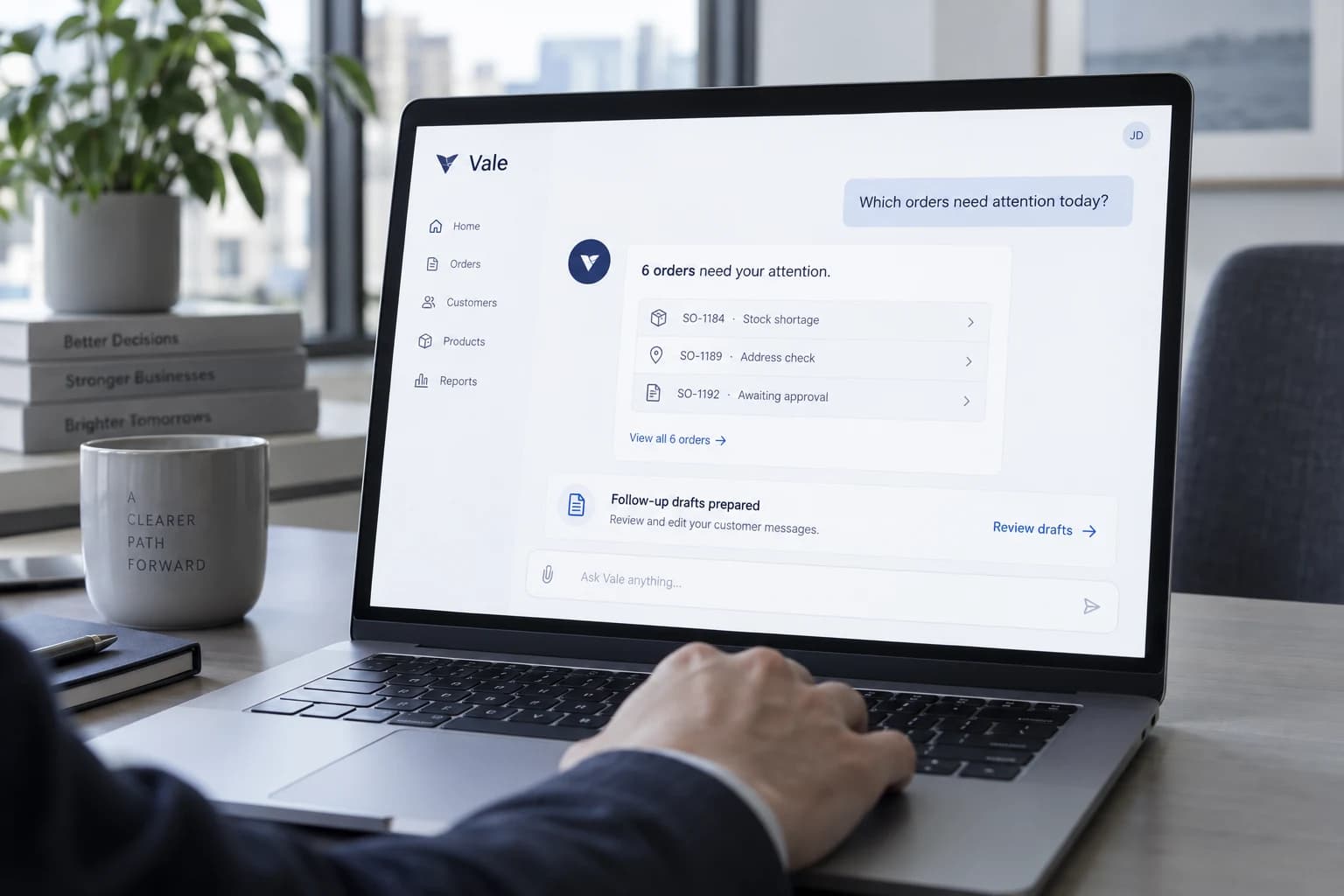
AI with business context
Ask which orders need attention, what is holding up an invoice or which quotes need a follow-up. We connect AI to the business information it needs to give a useful answer, with the relevant records available to check.
The next step can be practical: prepare a reply, summarise a request or assign a review. We define what the assistant can access, what it can do and where a person must approve an action.
Useful answers depend on reliable information. We test the assistant against real business scenarios before extending its role.
Built for the way work actually happens
Communicate with customers and teams across languages.
Designed for natural voice interactions across different accents.
Email, phone, WhatsApp, web and internal systems.
Give your assistant a name, role and personality that fit your business.
Connect your existing CRM, ERP, databases, APIs and business tools.
The right tool for each step
Some work needs interpretation. Some needs a dependable rule. A useful workflow knows the difference.
Follow a known rule.
When the trigger and next step are clear, agreed rules move the work forward.
Make sense of information.
When the input is an email, document or question, AI helps interpret what it means.
Together in one workflow
An everyday message becomes a work order, with the right checks in between.
AI proposes the details.
Your team stays in control.
Identify the air-conditioning fault and meeting room, then suggest a maintenance category.
Match the room to an equipment record and check for an existing open request.
The facilities team confirms the details, urgency and assignee before approving the task.
Save the approved task in the maintenance system and notify the assigned technician.
If a clear rule does the job, automation is enough. We add AI where understanding makes the difference.
AI in action
Choose a business job. See how Vale reads the context, responds clearly, and moves the work forward.
AI use cases
Vale can sit inside the workflows your team already knows, with the context and permissions to make a useful difference.
AI integration FAQs
What it can do, what it can access, and where your team stays in control.
A chatbot is one way to interact with AI. Integration can also help your team find information across approved sources, summarize requests, check documents, or prepare follow-up work inside existing tools. Useful access, business rules, and clear limits matter as much as the conversational interface.
Potentially, where supported access and permissions are available. We confirm which records can be read, how current they are, and which actions the systems allow. The scope may begin with selected sources or read-only access. We do not assume that every product or subscription exposes the same capabilities.
Not necessarily. Some workflows can use an existing model with access to approved business information, clear instructions, and representative examples for evaluation. Others need more data preparation or a different approach. We assess the task first rather than assuming you need a custom model or model training.
That depends on the selected provider, product, contract, and configuration. We review data use, retention, hosting location, and available controls before connecting sensitive information. A blanket promise is not appropriate across all providers. If you have restrictions on external processing or data location, raise them during discovery.
AI can produce plausible but incorrect answers. We define permitted sources, evaluate representative cases, and route uncertain or consequential outputs to a person. Where the source supports it, responses can include references for checking. If information is missing, the workflow should say so or ask for review rather than invent an answer.
Yes. We scope access around roles, records, and permitted actions. Reading a document or producing a draft does not automatically grant permission to send a message, update a customer record, or approve a transaction. Higher-impact steps can require explicit approval, with access checks enforced by the connected systems.
The starting point is reducing repetitive work and helping your team handle information more effectively. People still own business decisions, exceptions, and accountability. We define the tasks that are suitable for automation and the review work that remains; staffing reductions or fully autonomous operation are not assumed outcomes.
Start with one task and examples of an acceptable result. We agree a pilot, evaluation criteria, data access, and review boundaries. Ongoing costs may include model usage, hosting, connectors, monitoring, and maintenance. The scope should identify these separately and account for changes to models or provider services.
Explore discovery and a first buildNo. The website examples illustrate possible workflows using fictional records and authored scenarios. They do not establish access to your software or prove a particular model's accuracy. A real integration requires discovery, permission checks, and testing against your agreed examples before live use.
The next step is specific to your business