

Engineering explained
API integration, explained through one stock check
A website asks the inventory system whether an item is available. Follow the request, the permission check and the response without needing to read code.
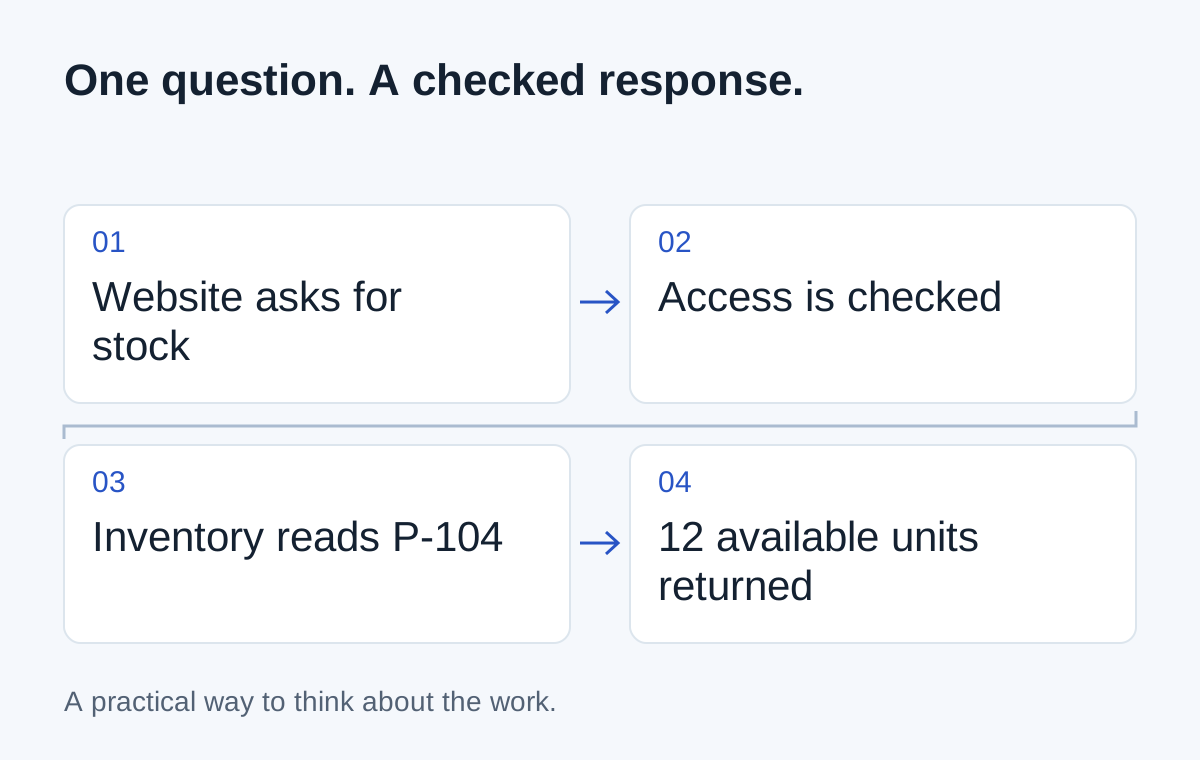
A customer selects a product on your website. Before showing availability, the website asks the inventory system how many units can be sold. The inventory system returns an answer.
That exchange is a useful way to understand a web API: a defined way for one piece of software to ask another for information or request an operation. The API determines what can be asked and how the exchange is structured. MDN's API glossary explains the broader term.
You don't need to write the request yourself to make sensible decisions about the integration. You do need to know what it asks, what the answer means and what happens when there isn't one.
Follow one request
In the illustration, the website asks for availability for product P-104. The inventory service checks that the request is authorised and returns 12 available units.
This is a fictional read-only example. It does not reserve stock, place an order or contact a real system.
The website prepares a request for available stock for product P-104.
The distinction matters. A customer seeing 12 available units is not the same as the inventory system reserving some of them. Another order could arrive between those steps. If you need reservations, ask how that separate operation works.
An API does not mean unlimited access
A system may expose product availability but not customer records. It may allow reading a booking but require a different permission to change it. Some operations may be unavailable on your subscription or limited to an approved partner.
Ask the vendor which operations your specific account can use. “It has an API” is the start of that check, not the conclusion.
The application also needs a way to authenticate itself and control access. Your implementation team should explain what access is granted without asking you to put credentials in an ordinary email or public document.
Requests and notifications solve different problems
A request is useful when one system needs an answer, such as a stock check. Many web APIs use HTTP's request-and-response model, described in MDN's HTTP overview.
A webhook works in the other direction: a system sends a notification when a selected event occurs. For example, a completed order might notify another service that work is ready to start. The receiver still needs to check and process that notification.
| Need | Possible approach |
|---|---|
| Check availability before continuing | Request a current value |
| React when an order changes | Receive an event notification |
| Prepare a weekly management report | Use a scheduled import or query |
Ask what happens when the answer is late
If the stock check times out, should the website show an old value, say availability cannot be confirmed, or let the customer request a callback? That's a business decision as well as a technical one.
For requests that change records, a retry needs particular care. The first request may have succeeded even if the reply was lost. The implementation must avoid creating a second order just because it didn't receive confirmation.
Bring four questions to the conversation
What information or operation do we need? Which system owns it? What access is supported? What should the team or customer see when the exchange fails?
A good explanation should connect each technical choice to one of those questions. You don't need an API vocabulary lesson before discussing the work. You need a clear account of what one system is asking another to do.
Next step
Have a similar situation in your business?
Tell us how the work happens today and where it gets difficult. We can help you work out a useful next step.
Talk through your situation