Decision guide / Software strategy
Custom software vs off-the-shelf software: which is right for your business?
A practical way to decide whether your business should buy an existing tool, configure one, or invest in software built around the way your operation actually works.
Most businesses do not need custom software simply because they are growing. They need it when the cost of forcing the business into someone else’s workflow becomes greater than the cost and responsibility of building something that fits.
That distinction matters. Buying a mature product can be faster, safer, and less expensive. Building can create a better operational fit, but it also creates ownership: your team must make decisions about architecture, security, maintenance, and change.
The right question is not “Is custom software better?” It is:
Which option gives the business the best balance of fit, speed, control, and long-term cost?
The short answer
Choose off-the-shelf software when your process is common, the product already integrates with the systems you use, and configuration can cover the important requirements without creating a maze of workarounds.
Consider custom software when your process is a meaningful competitive advantage, when several systems need to work together in a way existing products cannot support, or when the cost of manual work and operational exceptions is growing faster than the business.
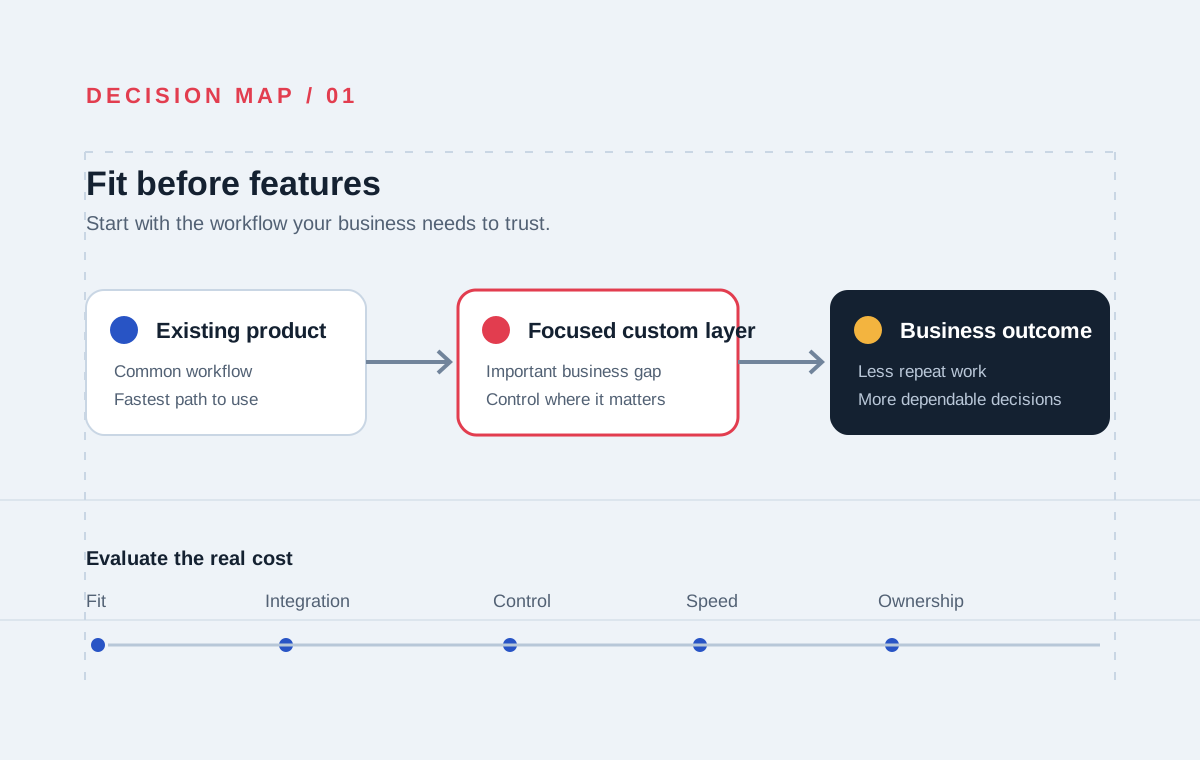
There is also a middle path: keep a proven product for the standard parts of the operation and build focused software around the gaps. This is often more sensible than replacing everything.
What the two choices actually mean
Off-the-shelf software
Off-the-shelf software is built for many organizations. It usually offers a known feature set, a subscription or licence model, vendor-managed updates, and a faster path to first use.
The trade-off is that your business accepts the product’s assumptions. You may need to change your process, add another tool, export data between systems, or pay for customisation and integration.
Custom software
Custom software is designed around a specific organisation’s workflows, users, data, and technical environment. It can be a customer-facing product, an internal business system, an integration layer, or a focused tool for one difficult operational process.
The trade-off is ownership. You are responsible for deciding what to build, how to operate it, how to secure it, and how it should evolve. That is a real responsibility, but it can also be a strategic advantage when the software is close to the value your business creates.
When off-the-shelf software is probably the better choice
An existing product is usually the right starting point when:
- Your workflow is common across many businesses.
- You need a capability quickly and can work within the product’s model.
- The vendor has strong integrations with your important systems.
- You do not want to own ongoing software operations.
- The product’s pricing remains reasonable as your users, data, or transaction volume grow.
- The vendor’s roadmap and support model fit your risk tolerance.
For example, a standard accounting, payroll, email, or document-management tool may be difficult to justify building yourself. The business value is often in using the capability reliably, not in owning its underlying software.
Buying is not the “less technical” choice. A good buying decision still requires attention to data export, permissions, integration limits, service availability, and what happens if the vendor changes direction.
When custom software starts to make sense
Custom software becomes more reasonable when several of these conditions are true:
1. The workflow is specific to your business
Your process may involve unusual approvals, pricing, scheduling, fulfilment, compliance, or operational rules. If employees constantly explain how the software should have behaved, the gap may be structural rather than a training problem.
2. The process creates competitive value
If the way you quote, serve, deliver, reconcile, or operate is part of why customers choose you, encoding that process in a system may protect and extend the advantage.
3. Existing tools do not share a reliable source of truth
Teams often start by connecting products with spreadsheets, exports, and manual updates. That can work for a while. It becomes dangerous when customers, inventory, payments, orders, or financial records disagree and no one can tell which record is current.
4. Workarounds are becoming a recurring operating cost
Add up the time spent copying information, checking exceptions, repairing data, producing reports, and explaining system limitations. The cost is not only staff hours. It is also slower decisions, delayed customer responses, and greater dependence on a few people who know the workaround.
5. You need control over the product or data
Ownership can matter when the software is the product you sell, when data needs to stay portable, when the business has unusual security requirements, or when a vendor’s limits would restrict future growth.
Compare the decision across five dimensions
| Dimension | Off-the-shelf | Custom software | | --- | --- | --- | | Initial speed | Usually faster to start | Requires discovery and delivery | | Process fit | You adapt to the product | The system adapts to the workflow | | Upfront cost | Often lower | Usually higher | | Ongoing control | Depends on the vendor | You own the roadmap and decisions | | Integration | Limited to supported connectors | Can be designed around your systems |
This table is useful, but it does not produce the decision by itself. The answer depends on which dimension is most expensive for your business to get wrong.
Do not compare only the subscription price
The price on a software vendor’s website is only one part of the cost. Compare the total cost of ownership over the period that matters to your business.
For an off-the-shelf product, include:
- Subscription or licence fees as usage grows.
- Implementation and configuration.
- Integration work and connector fees.
- Manual reconciliation and duplicate entry.
- Training and process changes.
- Data migration and export risk.
- The cost of replacing the product later.
For custom software, include:
- Discovery, architecture, and design.
- Product and engineering delivery.
- Hosting, monitoring, security, and backups.
- Testing and release management.
- Maintenance and future changes.
- Documentation and knowledge transfer.
The goal is not to make custom software appear cheaper. It is to compare the real costs of both paths honestly.
A practical decision framework
Score each question from 1 to 5, where 1 means “not important” and 5 means “critical”.
- How unique is the workflow?
- How much revenue or operational value depends on it?
- How costly are the current workarounds?
- How many systems need to exchange data?
- How important is control over the roadmap?
- How quickly must the first useful version be available?
- How much internal capacity exists to own the outcome?
High scores on uniqueness, operational value, integration complexity, and control suggest that a custom or hybrid approach deserves investigation. A high score on speed, with low uniqueness and low integration complexity, usually favours an existing product.
This is a starting point, not an automated answer. A short technical discovery should test the assumptions before a business commits to a build.
The hybrid option is often the most practical
Many successful systems combine standard tools with focused custom engineering:
- Keep the accounting platform, but automate the flow of approved records into it.
- Keep the CRM, but build a customer portal around the experience it cannot provide.
- Keep the commerce platform, but create an operational layer for fulfilment and exceptions.
- Keep the payment provider, but design the transaction state and reconciliation process around the business.
This approach protects the value of proven products while giving the business control where the workflow is genuinely different.
Questions to ask before choosing
Before asking a software company for a proposal, document:
- Which process is failing or slowing the business?
- Who uses it and what decisions do they make?
- Which systems are involved?
- Where does the same information get entered more than once?
- Which records must be accurate for finance, customers, or compliance?
- What would a useful first release change?
- What should remain with existing software?
- Who will own decisions after launch?
Clear answers make it easier to decide whether you need a new product, an integration, a focused internal tool, or simply a better configuration of what you already have.
Final recommendation
Do not begin with “we need custom software”. Begin with the workflow that is creating measurable friction and the outcome the business needs.
If an existing product handles the process well, use it. If the process is strategically important and existing tools force expensive compromises, investigate a custom or hybrid system. The best technical partner should be willing to recommend the simplest option that solves the real problem—even when that option is not a large build.
If you are comparing these paths, SystemVale can help you map the workflow, identify the system boundaries, and decide what should be bought, integrated, modernized, or built.
Frequently asked questions
Is custom software only for large companies?
No. Smaller businesses can benefit from focused custom systems when a specific workflow, integration, or customer experience matters. The scope should match the business problem; a smaller company does not need an enterprise-sized platform to solve one expensive bottleneck.
How long does custom software take to build?
It depends on the workflow, integrations, quality requirements, and what “ready” means for the business. A focused first release can be planned separately from later capabilities. A reliable estimate should follow discovery rather than precede it.
Should we build everything from scratch?
Usually not. Reuse mature services and products where they are a good fit. Customise the parts that create value or need to connect the operation together.
What if we already have a legacy system?
You may not need to replace it immediately. Stabilising it, adding a reliable interface, or modernising one business capability at a time can reduce risk while creating progress.
What should we do first?
Map the workflow, systems, users, data, failure points, and desired outcome. That gives you a much better basis for deciding than starting with a list of software features.
A useful next step
Good software decisions start with the workflow, not the feature list.
See how we workNext step
Not sure whether you should build, buy, or integrate?
We can help you assess your workflow, existing systems, and long-term requirements before you commit to a software direction.
Discuss your software options